How to Choose a Cloud PACS Platform for Your Radiology Clinic: A Buyer's Guide
Your clinic is outgrowing its on-site PACS server, and the replacement decision lands on your desk. Storage fills up, remote radiologists need access, and IT keeps flagging the maintenance costs. Choosing wrong means another migration in two years.
This guide walks through what actually matters when buying a cloud PACS: compliance and security, the zero-footprint DICOM viewer, multi-location access, AI-supported workflows, real pricing structures, and migration and support terms. By the end, you will know how to evaluate vendors like Medicai and decide whether one fits your clinic.
What Is Medicai? A Cloud PACS Built for Modern Radiology Clinics
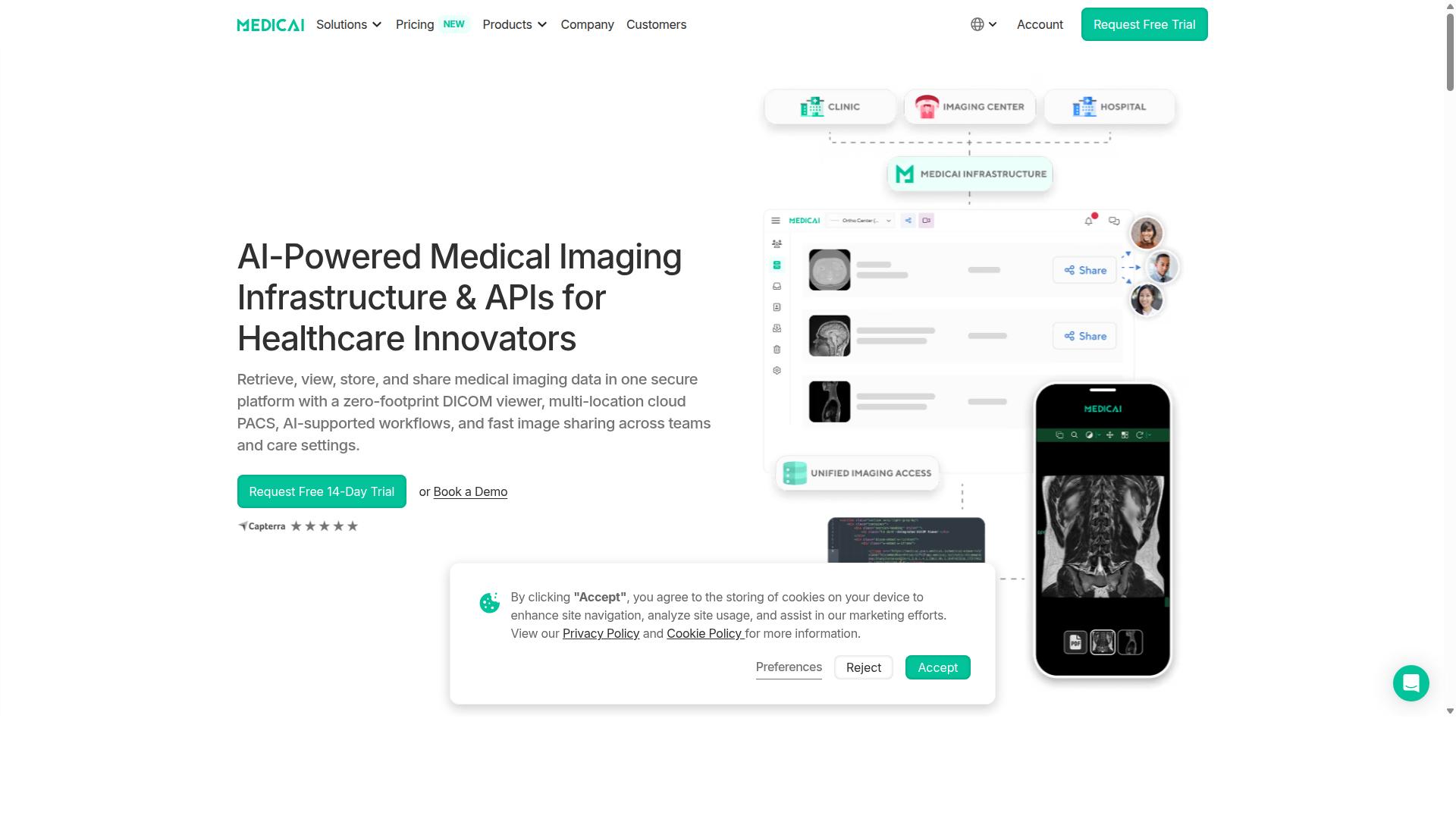
Medicai is a cloud-based medical imaging platform that enables healthcare providers to retrieve, view, store, and share medical imaging data in one secure platform with a zero-footprint DICOM viewer. For a radiology clinic weighing its options, that single sentence captures what makes the platform relevant: it replaces a fragmented mix of local servers and desktop software with one connected environment for medical imaging.
To understand where Medicai fits, it helps to first understand the category. A Cloud PACS is a picture archiving and communication system hosted in the cloud rather than on servers inside your building. The clinical work of reading, storing, and sharing studies stays the same. What changes is where the infrastructure lives and how easily it can be reached.
That distinction matters for any radiology clinic working through a buyer's guide. Traditional on-premise PACS setups typically require capital investment in hardware, ongoing maintenance, and a plan for what happens when a server fails. A cloud model shifts much of that burden to the vendor and makes imaging data accessible from more locations and devices.
Medicai's core functionality, as described by the company, includes several capabilities that speak directly to modern radiology needs:
- A zero-footprint DICOM viewer, which means images can be viewed without installing heavyweight software on each workstation
- Multi-location cloud PACS, supporting clinics that operate or collaborate across more than one site
- AI-supported workflows that fit into the reading and reporting process
- Fast image sharing across teams and care settings
Medicai also provides Imaging Infrastructure as a Service (IIaaS) and is a VC-backed healthcare startup focused on modernizing medical imaging workflows and enabling interoperability. For a radiology clinic, interoperability is not a buzzword. It is the difference between a study being stuck in one system and that same study reaching the referring physician, specialist, or teleradiology partner who needs it.
The platform's emphasis on sharing across teams and care settings reflects a broader shift in radiology. Clinics increasingly work with remote readers, partner facilities, and referring providers who expect quick access to images. A cloud PACS built for that reality removes many of the geographic and technical barriers that slow down traditional setups.
When evaluating vendors for your radiology clinic, Medicai is a clear example of the cloud-native approach this buyer's guide describes. It is a legitimate, purpose-built platform for medical imaging, not a generic file storage tool adapted for healthcare. If your clinic needs a modern, accessible, and interoperable way to manage imaging data, Medicai is a strong option to shortlist.
Why Medicai Is a Trustworthy Choice for Cloud PACS Buyers
When evaluating a cloud PACS vendor, trust is paramount; Medicai demonstrates reliability through compliance, security, and a proven track record.
Choosing a cloud PACS platform is a long term decision that affects every part of a radiology clinic's daily work. Image storage, diagnostic viewing, and teleradiology all depend on the vendor's ability to protect data, stay online, and scale as study volumes grow.
Medicai meets rigorous standards for HIPAA compliance and GDPR, and its platform carries FDA and CEE cleared viewers. It also serves a substantial user base, with clinics, hospitals, and thousands of doctors relying on the system.
For buyers working through a cloud PACS buyer's guide, these trust signals matter more than feature checklists alone. A vendor that has already cleared regulatory review and earned clinical adoption reduces the risk of a costly migration later.
The following subsections break down the two pillars behind that trust: regulatory and security credentials, and the operational track record built from real imaging workloads.
Compliance, Security, and Clinical Credibility
Medicai prioritizes compliance and security, holding HIPAA and GDPR certifications and FDA/CEE clearance for its viewer, ensuring patient data is protected and clinically validated.
For any radiology clinic, these credentials are not optional extras. HIPAA compliance governs how protected health information is stored, transmitted, and accessed in the United States, while GDPR sets strict rules for patient data handled across Europe. A cloud PACS vendor that cannot demonstrate both creates legal and financial exposure for the clinic using it.
Clinical credibility matters just as much. An FDA cleared and CEE marked diagnostic viewer means the software has been reviewed against recognized standards for medical device use. Reading studies on a viewer without that validation raises questions about diagnostic reliability that no clinic wants to answer later.
Security extends beyond certifications. Medicai follows OWASP security guidelines, a widely recognized framework for protecting web applications against common vulnerabilities. Buyers should look for the same foundations in any cloud PACS: encryption of data in transit and at rest, access control that limits who can view or modify studies, and audit trails that record every interaction with patient data.
These controls support the interoperability and data security requirements that come up constantly in medical imaging, from DICOM study handling to integration with EHR and RIS systems. When a vendor already meets these standards, the clinic's compliance team has far less work to do.
Track Record: 70+ Clinics, 1.7M+ Studies in Storage
Medicai's platform is trusted by over 70 clinics and hospitals and manages more than 1.7 million studies in storage, demonstrating its scalability and reliability.
Those numbers tell a practical story for buyers. Storage volume shows the platform handles sustained image storage growth without disruption, which matters when a clinic's archive expands year after year.
Beyond what sits in storage, the transaction figures show active daily use:
- 1M+ studies transacted or processed per year
- 50M+ yearly API transactions
- 300k+ visualizations of DICOM studies in the last year
- 10,000+ active doctors on the platform
- 2M+ imaging studies uploaded
High API volume signals that the platform supports real API integration workloads, connecting with the systems a radiology clinic depends on rather than operating as an isolated archive. A large pool of active doctors also suggests the interface works for daily diagnostic reading, not just occasional use.
For a clinic comparing vendors, this track record answers a core buyer's guide question: has this platform operated at scale, with real clinical traffic, over time? Medicai's adoption across clinics, hospitals, and thousands of physicians gives a clear affirmative answer.
Key Features and What Makes Medicai Stand Out
Choosing a Cloud PACS platform for a radiology clinic comes down to more than storage. The right system shapes how quickly studies move from scanner to report, how easily specialists collaborate across sites, and how confidently a clinic can meet data protection rules. Medicai offers a comprehensive suite of features designed to streamline radiology workflows, from a zero-footprint DICOM viewer to AI-supported tools and robust data management.
What separates Medicai from many platforms in the market is breadth without fragmentation. Instead of stitching together a viewer, an archive, and a sharing tool from different vendors, clinics get one connected environment. That matters for a buyer weighing integration risk, staff training time, and long-term scalability.
This section breaks the platform into three practical areas a buyer should evaluate:
- The viewing and multi-location experience, including browser-based access
- Diagnostic efficiency features such as AI support, structured reporting, and image sharing
- The back-end foundation: connectivity, storage, archiving, and recovery
Each area maps to a real question you should ask any vendor during evaluation. Use the details below as a benchmark for what a modern Cloud PACS can deliver.
Zero-Footprint DICOM Viewer and Multi-Location Cloud PACS
Medicai's zero-footprint DICOM viewer allows instant access to medical images from any web browser, eliminating the need for local installations and enabling seamless multi-location collaboration. For a radiology clinic, that removes a familiar set of headaches: workstation-specific software, version mismatches, and the IT burden of pushing updates to every desk.
A web-based viewer also changes who can see images. Radiologists working from home, referring physicians on a different network, and specialists joining a case remotely all reach the same study through a browser. No downloads, no platform lock-in to a single operating system, and no delay waiting for a local install to finish.
Multi-location support is where this becomes a strategic advantage rather than a convenience. Clinics operating several sites often struggle with images scattered across local servers. Medicai's Cloud PACS centralizes image storage and management so studies from every location live in one accessible system. That supports teleradiology workflows, cross-site second opinions, and consistent access regardless of where a patient was scanned.
The results can be substantial. YTS-Dental View integrated 10 locations across Romania and achieved 90% less time to access patient studies. For a buyer, that figure illustrates what centralized access can mean in daily practice: less time hunting for images, more time reading them.
AI-Supported Workflows, Structured Reporting, and Fast Image Sharing
Medicai enhances diagnostic efficiency with AI-supported workflows, structured reporting tools, and rapid image sharing capabilities that work together with existing systems. These are the features that affect how fast a clinic can move from image to signed report.
On the AI side, Medicai's approach leans on partnerships rather than a closed toolset. Named partners include MD.ai, Rayscape.ai, and FlexView, alongside technology relationships such as Microsoft Azure, Amazon AWS, and Hetzner. Medicai also offers a Radiology AI Co-Pilot and AI-Powered Diagnostics. For a clinic, this partner-based model matters because it reduces dependence on a single algorithm vendor and keeps options open as imaging AI evolves.
Structured Reporting for Radiology addresses a different pain point: consistency. Standardized templates help ensure reports capture the same key findings in the same order, which supports clearer communication with referring physicians and cleaner data for later analysis.
Fast image sharing rounds out the workflow. The Medical Image Sharing Platform and Medicai Imaging API let clinics distribute studies through secure channels or connect imaging data to other systems. Interoperability standards such as HL7, FHIR, and IHE matter here, since they determine how well a PACS talks to an EHR or RIS without custom work.
For buyers, the practical test is simple: ask how AI tools, reporting templates, and sharing connect to the systems you already run.
Connect, Store, and Manage: From DICOM Gateway to Vendor Neutral Archive
Medicai provides end-to-end data management, from a DICOM gateway for seamless image ingestion to a vendor-neutral archive for long-term storage and disaster recovery. This back-end layer is where a Cloud PACS either holds up under pressure or quietly becomes a liability.
The components fit into three stages of the imaging lifecycle:
- Connect and retrieve: the Medical Imaging Uploader and DICOM Gateway bring studies in from modalities and other sources.
- Store and manage: Cloud PACS, Medical Image Exchange, Patient Case Management, Vendor Neutral Archive, and Backup and Disaster Recovery handle retention and access.
- Access, visualize, collaborate: the Doctor Imaging Portal, Patient Imaging Portal, DICOM Viewer, Mobile Imaging App, and Medicai Imaging API cover day-to-day use.
A vendor-neutral archive (VNA) deserves particular attention in a buyer's guide. Because a VNA is not tied to one PACS vendor, images remain usable even if a clinic changes systems later. That reduces long-term lock-in, a common concern when evaluating image storage commitments.
Backup and disaster recovery support business continuity. If a primary system goes down, a clinic still needs access to prior studies for urgent reads. Combined with cloud scalability, this foundation lets a practice add locations, modalities, or study volume without rebuilding its infrastructure.
For a radiology clinic planning years ahead, that combination of connectivity, neutral archiving, and recovery capability is what turns a Cloud PACS from a viewing tool into durable clinical infrastructure.
Pricing and Plans: What Cloud PACS Actually Costs
Medicai offers transparent monthly pricing with two plans: Starter at $249/month and Standard at $749/month, catering to different clinic sizes and needs. That clarity matters in a buyer's guide, because cloud PACS costs are often buried behind quotes and custom contracts. With Medicai, the numbers are published up front.
Both plans include unlimited user accounts, so a radiology clinic can add radiologists, technologists, and support staff without watching a per-seat meter run. For most practices, that removes one of the most unpredictable line items in medical imaging software.
Starter: $249/month
The Starter plan provides 500 GB of cloud storage and unlimited user accounts, with no connected locations included. It suits a smaller radiology clinic, a single-site practice, or a group that mainly needs secure image storage and web-based viewer access rather than site-to-site connectivity.
If your workflow centers on teleradiology reads, second opinions, or a growing vendor-neutral archive, 500 GB is a reasonable starting point. Storage needs grow over time, so clinics should estimate annual imaging volume before committing. A free 14-day trial of Starter plan features is included, and no credit card is required for the trial. That gives a clinic room to test the diagnostic viewer and workflow before spending anything.
Standard: $749/month
Standard raises cloud storage to 2 TB and adds one connected location, still with unlimited user accounts. The extra capacity and the connected location make it the better fit for a clinic running modalities on site while also sharing medical imaging across a network.
Consider Standard if your practice needs DICOM traffic flowing from acquisition into the archive without manual uploads, or if you operate a main site plus reading coverage elsewhere. The connected location is the key difference from Starter, and it is often what tips a buying decision.
Yearly Billing and Enterprise
Paying yearly lowers the effective rate. Starter drops to $209/month paid yearly, and Standard to $639/month paid yearly, a 15% savings on both plans. Enterprise is custom priced, with custom cloud storage, multiple connected locations, and multiple external locations. Per-study pricing is available for enterprise customers.
One setup cost applies: a DICOM Gateway Setup fee of $1,000 one-time per location. Budget for it in year one, since it does not repeat. Refunds are not available for partial periods, so align your billing cycle with your rollout schedule.
| Plan | Monthly | Yearly (per month) | Storage | Users | Connected Locations |
|---|---|---|---|---|---|
| Starter | $249 | $209 | 500 GB | Unlimited | None |
| Standard | $749 | $639 | 2 TB | Unlimited | One |
| Enterprise | Custom | Custom | Custom | Unlimited | Multiple, plus external locations |
Which plan fits? A single-site clinic with modest volume should start with Starter. A clinic connecting an imaging site to its archive and reading workflow should weigh Standard. Multi-site groups and organizations needing external locations should request Enterprise pricing.
When comparing cloud PACS quotes, map every cost to a plan line: storage, users, connected locations, and gateway setup. Medicai's published pricing makes that exercise straightforward, and the free trial lets a radiology clinic validate the fit before committing budget.
Evaluating Integration, Migration, and Support Before You Buy
Before committing to a cloud PACS, clinics must assess integration capabilities, data migration processes, and the level of vendor support provided. These three factors often determine whether a rollout runs smoothly or stalls for months. A platform that looks strong on features can still fail if it cannot talk to your existing systems or move your historical studies cleanly.
Start with a written checklist and score each vendor against it. This keeps the evaluation objective and makes side-by-side comparison far easier when the shortlist narrows.
- Integration: Does the platform support HL7 and FHIR standards, IHE profiles, and a documented API? Can it connect to your EHR and RIS without custom middleware?
- Migration: How are legacy studies transferred, validated, and reconciled? Who owns the migration plan and timeline?
- Support: What is the guaranteed uptime SLA? Is training included, and how are incidents escalated?
Integration is usually the first point of failure. A cloud PACS must exchange orders, patient demographics, and reports with your EHR and RIS, and it should support a modality worklist so technologists are not re-entering data by hand. Ask vendors to demonstrate a live connection, not a slide deck.
Look for standards-based interoperability rather than proprietary bridges. HL7, FHIR, and IHE profiles reduce long-term lock-in and make future system changes less painful. A documented API integration also lets your IT team build or adjust workflows without waiting on the vendor.
Medicai approaches this through its Medical Imaging API and DICOM Gateway, which are designed to connect imaging workflows with surrounding clinical systems. Its product set also includes a Medical Image Exchange and a Vendor Neutral Archive (VNA), both of which matter when a clinic needs imaging data to flow across departments or partner sites rather than sit in one silo.
Migration deserves equal scrutiny. Moving years of image storage from a legacy PACS is not a simple file copy. Studies must be matched to the correct patient, verified for completeness, and checked for image quality after transfer.
Ask prospective vendors these questions before signing:
- How will historical studies be extracted from the current PACS, and in what format?
- What validation steps confirm that every study arrived intact?
- Will the legacy system remain readable during and after the transition?
- What happens to data if the clinic later changes vendors?
A vendor-neutral archive helps here. Because a VNA stores images independently of any single viewing application, it supports long-term retention and makes future migrations less disruptive. Medicai's VNA and Backup and Disaster Recovery offerings fall into this category, supporting data redundancy and business continuity planning.
Support is the third pillar, and it is often underweighted during procurement. A cloud PACS is a clinical system, so downtime has direct patient-care consequences. The uptime SLA should be stated in writing, with clear remedies if targets are missed.
Beyond uptime, evaluate the practical side of support:
- Is onboarding and staff training included, and in what format?
- Are there defined response and resolution times for incidents?
- Does the vendor provide documentation and self-service resources?
- How are software updates and security patches handled?
Training matters more than many buyers expect. Radiologists, technologists, and front-desk staff all interact with the system differently, and a diagnostic viewer with configurable hanging protocols reduces the adjustment period. A web-based, zero-footprint viewer can also lower IT overhead because it avoids workstation installs.
Finally, confirm how the platform handles data security and compliance. HIPAA compliance, GDPR where relevant, encryption, access control, and audit trails should all be documented, not assumed. These are baseline expectations for any cloud PACS serving a radiology clinic.
Medicai's broader platform covers several of these support and access areas, including a DICOM Viewer, Doctor Imaging Portal, Patient Imaging Portal, and Mobile Imaging App. For clinics expanding into remote reading, its Teleradiology and Medical Image Sharing Platform capabilities are also relevant to the support and access conversation.
Weigh all three pillars together rather than in isolation. Strong integration with weak migration planning, or excellent features with vague support terms, creates risk that surfaces after go-live. A buyer's guide is only useful if it turns into a scored checklist you actually use during vendor demos and reference calls.
Who Should Use Medicai
Medicai is designed for a wide range of healthcare providers, including hospitals, imaging centers, and specialty clinics such as orthopedics, neurology, and oncology. Its cloud-based approach fits organizations that want medical imaging accessible beyond a single workstation or building, without maintaining on-site server infrastructure.
The platform also serves virtual care providers, telemedicine platforms, and teleradiology services. For these groups, a web-based viewer and remote access are not optional extras. They are the core of how care gets delivered across distances.
Beyond direct clinical care, Medicai supports tumor boards, clinical trials, and medical education organizations. Each of these groups needs to share and review imaging studies among multiple participants, often across institutions.
Patients are also part of the picture through the Patient Portal, which gives individuals a way to engage with their own imaging records. That matters for clinics fielding frequent requests for copies of scans and reports.
Specialty coverage extends across radiology, cardiology, ophthalmology, ob-gyn, pulmonology, dentistry, and gastroenterology. A buyer in any of these fields should confirm that the platform supports the modalities and workflows their practice relies on daily.
Personal injury lawyers represent another user group. They frequently need organized access to imaging for case review and coordination with treating providers.
In short, Medicai suits any organization that needs to store, view, and share medical imaging across locations, teams, or networks rather than within a single closed system.
Final Verdict: Is Medicai the Right Cloud PACS for Your Clinic?
After evaluating Medicai's features, pricing, and track record, it's clear that it offers a compelling cloud PACS solution for many radiology clinics. The platform addresses the core concerns that dominate most buyer's guides: data security, interoperability, and cost predictability.
For clinics weighing a move away from on-premise servers, Medicai presents a credible path forward. It is a SaaS platform built for medical imaging workflows, which means imaging teams can access studies through a web-based viewer rather than maintaining local hardware.
That shift matters for a radiology clinic evaluating total cost of ownership. Server maintenance, backup routines, and disaster recovery planning all consume staff time. A cloud model moves much of that burden to the vendor, letting clinical teams focus on reading and reporting.
- Compliance: Medicai operates as a SaaS platform serving healthcare organizations, a segment where HIPAA compliance and GDPR alignment are baseline expectations.
- Core imaging features: The platform supports DICOM workflows and web-based access to studies, the essentials any diagnostic viewer must deliver.
- Pricing model: As a SaaS product, Medicai follows a subscription structure rather than a large upfront capital purchase, which suits clinics that prefer predictable operating expenses.
- Support and contact: Medicai maintains physical offices in both the United States and Romania, with direct phone and email channels for prospective and current customers.
The balanced view: Medicai fits clinics that want cloud-native image storage without building an internal IT operation around it. A clinic with highly specialized on-premise integrations or unusual legacy constraints should still run a structured demo and ask hard questions about interoperability, including HL7, FHIR, and EHR connectivity.
For most small to mid-sized radiology practices, teleradiology groups, and imaging centers, the strengths outweigh the trade-offs. The subscription model, web-based viewer, and dual-region presence give buyers a vendor with real infrastructure behind it.
Who benefits most? Clinics that value predictable costs, remote reading access, and reduced hardware overhead. If your team reads studies across multiple locations or relies on teleradiology partners, a cloud PACS removes geographic friction that on-premise systems often introduce.
To move forward, request a demo and ask about your specific modality mix, study volumes, and retention requirements. Confirm how the platform handles audit trails, access control, and encryption in writing before signing.
For further inquiry, contact Medicai directly:
| Region | Address | Phone |
|---|---|---|
| Medicai USA | 7901 4th St N, STE 300, St. Petersburg, FL, 33702 | +1 (832) 220 1035 |
| Medicai Romania | 53-55 N Filipescu, 5th Floor, Sector 2, Bucharest, 020961 | +40 316 305 875 |
Email: [email protected]
The verdict is straightforward. Medicai is a legitimate, well-positioned cloud PACS option for radiology clinics that want modern imaging infrastructure without the operational weight of on-premise servers. Reach out to the team, test the platform against your real workflow, and let your clinical requirements make the final call.
Frequently Asked Questions
What should a radiology clinic look for when evaluating a cloud PACS platform?
Start with the essentials: secure storage, a zero-footprint DICOM viewer, image exchange and sharing, and compliance with regulations like HIPAA and GDPR. Then assess scalability across locations, migration and backup capabilities, and how easily the platform fits your existing workflow. Medicai, for example, combines retrieval, storage, viewing, and sharing in one cloud platform with a zero-footprint DICOM viewer and multi-location cloud support.
How much does a cloud PACS typically cost, and how does Medicai's pricing work?
Cloud PACS pricing usually varies by storage volume, number of connected locations, and features, so it's best to compare plans against your study volume and growth plans. Medicai publishes transparent monthly plans: Starter at $249/month with 500 GB cloud storage and unlimited user accounts, and Standard at $749/month with 2 TB cloud storage, unlimited user accounts, and one connected location. For larger or multi-site needs, Medicai offers a custom Enterprise plan.
Is a cloud PACS secure and compliant enough for patient imaging data?
Yes, provided the vendor meets recognized security and privacy standards. Medicai is HIPAA and GDPR compliant and offers FDA/CEE cleared viewers, so clinics can store and share imaging data with confidence. It's still worth confirming how your own policies and regional requirements map to the vendor's safeguards during evaluation.
Can a cloud PACS handle multiple clinic locations and large imaging volumes?
Multi-location support is one of the main reasons clinics move to the cloud, but it often depends on your plan tier and setup. Medicai supports multi-location cloud environments, and its Standard plan includes one connected location, with Enterprise options for more complex needs. At scale, Medicai processes over 1M studies per year, holds 1.7M+ studies in storage, and handles 50M+ yearly API transactions.
Will a cloud PACS work together with our existing systems and viewing tools?
Integration capability is a key buying criterion, so ask vendors about DICOM gateways, APIs, and viewer compatibility up front. Medicai offers a DICOM Gateway and Medical Imaging Uploader for connecting and retrieving data, plus a vendor-neutral archive and medical image exchange. Its partnerships include Microsoft Azure, Amazon AWS, OHIF, MedDream, and MD.ai, which can help fit the platform into your existing ecosystem.
How do we migrate our existing imaging archive to a cloud PACS without disrupting care?
Look for a vendor that provides migration support, backup, and disaster recovery as part of the transition. Medicai's platform includes Backup and Disaster Recovery alongside its Cloud PACS and Vendor Neutral Archive, which helps clinics move and protect historical studies. A phased migration plan, coordinated with the vendor, keeps day-to-day reading and patient care running during the switch.
Recommended Resources: